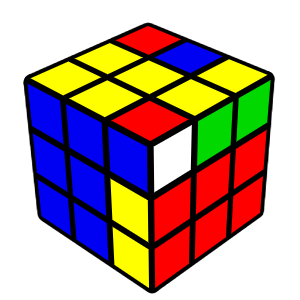
Right Insert
R U R'
Use when the pair is already formed and above the right slot.
R U R'
Use when the pair is already formed and above the right slot.
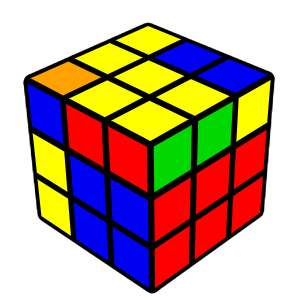
Left Insert
L' U' L
Same as right insert, but for the left slot.
L' U' L
Same as right insert, but for the left slot.
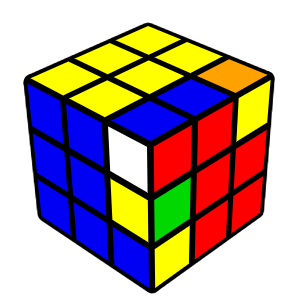
Right Pair
U R U' R'
Pairs corner and edge when they’re separate. Insert with R U R'.
U R U' R'
Pairs corner and edge when they’re separate. Insert with R U R'.
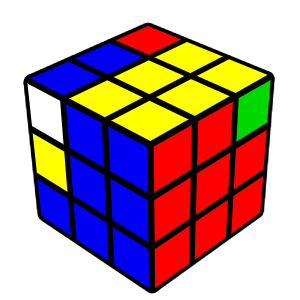
Left Pair
U' L' U L
Mirror of right pair. Use when pieces are on the left.
U' L' U L
Mirror of right pair. Use when pieces are on the left.
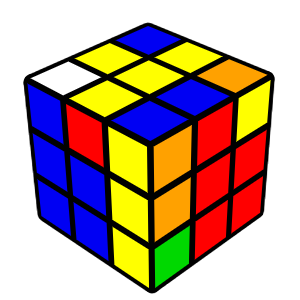
White-Upper-Left
R U2 R' U R U' R'
Corner has white on top. Reorient, pair, and insert.
R U2 R' U R U' R'
Corner has white on top. Reorient, pair, and insert.
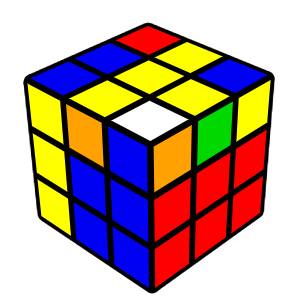
White-Upper-Right
L' U2 L U' L' U L
Same as above, mirrored for the left slot.
L' U2 L U' L' U L
Same as above, mirrored for the left slot.